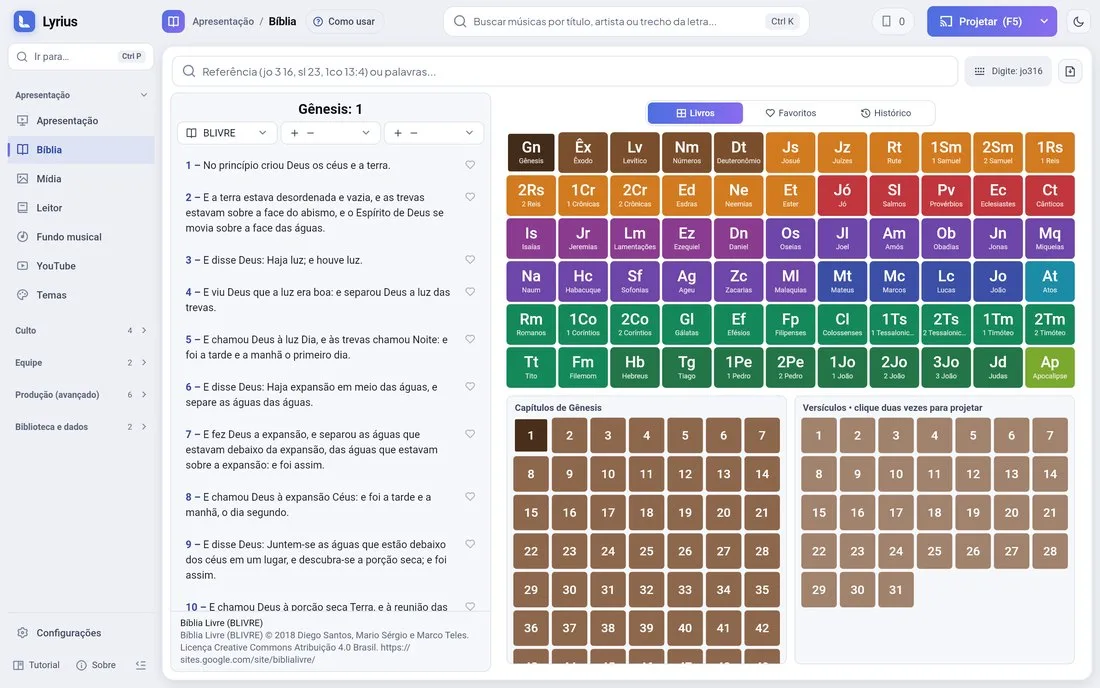
Finding and projecting
- Type fast: "jo316" opens John 3:16; "ps23" opens Psalm 23; "1co13:4" works too.
- Or browse: book › chapter › verse.
- Click a verse to select it; double-click or Enter projects it. The arrow keys move to the next and previous verses.
- The reference (book, chapter and verse) shows at the bottom of the screen.
- Settings › Bible › "Project while typing": the verse goes on screen as soon as the reference is complete.
Versions
- Bíblia Livre comes installed (its attribution appears on screen, as the license requires).
- Settings › Bible: download other translations in many languages, with progress, and remove the ones you do not use.
- Parallel versions show two translations together on screen.
- You can also switch the version and download others from the phone.
Study shortcuts
Favorites and history keep the passages you use the most.
Note: some translations are copyrighted by their publishers. A notice appears on each version before you download it.