Building the service
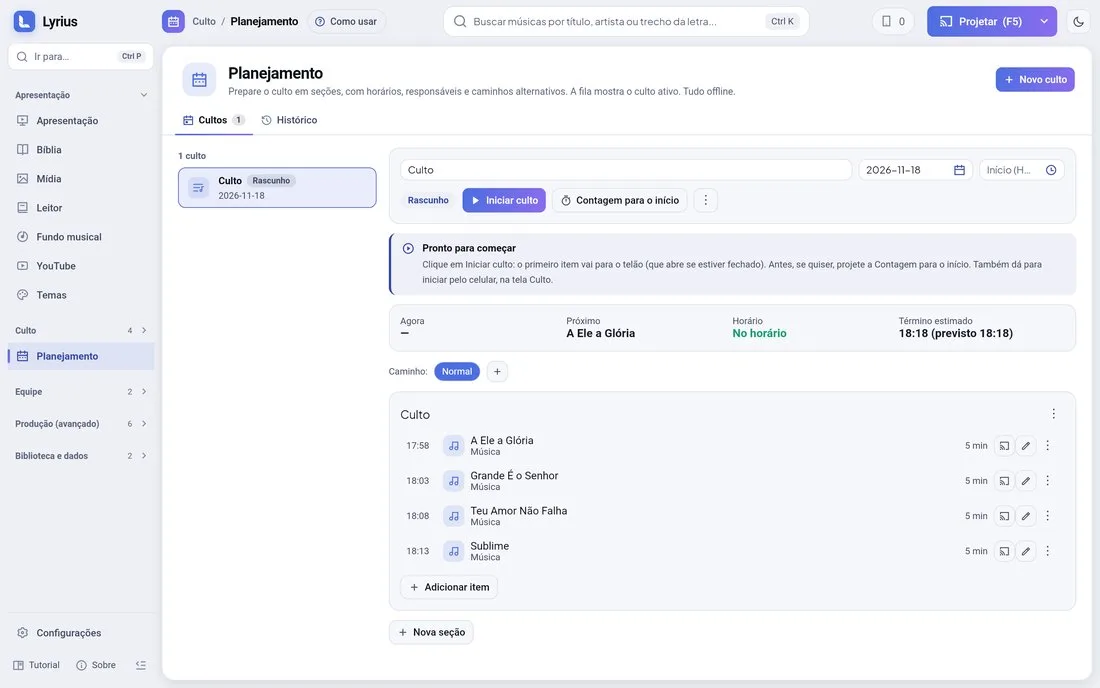
- 1Planning › new service, with date and start time.
- 2Create sections (Worship, Word, Announcements...) and add items. There are 10 types: song, Bible reading, media, announcement, prayer, sermon, offering, countdown, custom and automation.
- 3On each item: duration, person in charge, notes, attachments and a message sent to the stage when the item starts.
- 4Mark the service as ready. While you build it, it stays a draft.
The run of show
With each item’s planned time, Lyrius calculates the end time and, live, shows whether the service is running late or early.
Running it
- "Countdown to start" projects the time left until the service starts full screen (its style is in the service’s three-dot menu).
- "Start service" puts the first item live and opens the projection screen if it is closed.
- Next/Previous move through the items. With "Project when advancing" on, the item goes straight to the screen.
- "Project item" (or double-click) projects any item, even in a draft service.
Alternative paths
Prepare variations (for example, "If it rains", "Short version") and switch mid-service without losing the history.
After the service
The history keeps the real time of each item. Insights shows the most used songs, the average service length and planned × actual.